OpenLaw, Inc. · lexi.law · Effective: July 15, 2026
1. Program overview
Lexi AI Appointment & Demo Updates is a text-messaging program operated by Lexi AI, a product of OpenLaw, Inc. It helps people who book a demo, automation-audit, or implementation call on lexi.law manage that appointment. Messages are sent from our toll-free number +1 (833) 384-6184 and, on supported devices, from our verified “Lexi AI” RCS business sender. This is a one-to-one, appointment-based program. We do not send promotional or marketing messages through this program.
RCS agent description: Lexi AI sends appointment confirmations, reminders, updates, and replies about scheduled calls.
2. How you opt in
Book-a-demo flow. Visit lexi.law/book-a-demo, complete the introductory questions, and continue to the booking-details form. The mobile-number field is optional and the text-message checkbox is unchecked by default. To opt in, enter a mobile number, check “Yes, send me Lexi AI appointment updates by text,” choose an appointment time, and confirm the booking. You can book without checking the box, in which case no text messages are sent.
Free automation-audit flow. Visit lexi.law/automation, complete the free audit, open the consultation-booking form, choose a time, and enter your contact details. The mobile-number field is optional and the separate text-message checkbox is unchecked by default. To opt in, check “Yes, send me Lexi AI appointment updates by text,” enter a mobile number, and confirm. You can confirm the booking without checking the box, in which case no text messages are sent.
Text appointment updates
Text messaging is optional and separate from booking your call.
By checking this box, you agree to receive appointment confirmations, reminders, reschedule and cancellation updates, and conversational replies about your appointment from Lexi AI Appointment & Demo Updates, operated by OpenLaw, Inc., at the number provided. Consent is not a condition of purchase. Message frequency varies. Message and data rates may apply. Reply HELP for help. Reply STOP to cancel. SMS/RCS Policy · Terms of Service · Privacy Policy
Open the publicly hosted opt-in screenshot.
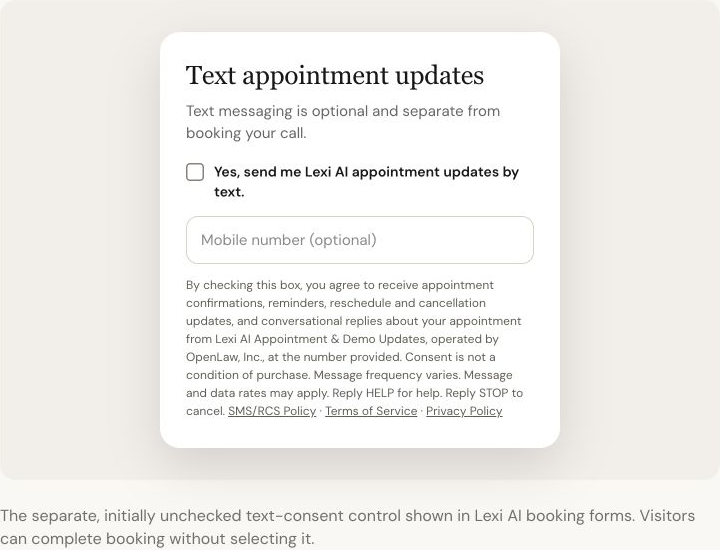
Implementation-call flow. A signed-in Lexi customer opens “Deploy Lexi,” chooses an implementation-call time, and continues to the details form. The mobile-number field is optional and the text-message checkbox is unchecked by default. The customer opts in only by entering or confirming a mobile number, checking the separate text consent box, and booking the call. The call can be booked without text consent.
We do not collect consent for this program through verbal calls, QR codes, purchased lists, or any other method. Each opt-in control is optional, applies only to text messages, and displays every disclosure on the same screen as the control.
3. What we send and how often
Messages include appointment confirmations, reminders shortly before your call, updates when an appointment is rescheduled or cancelled, and conversational replies from Lexi, our AI assistant, when you text us a question about your appointment or audit. Message frequency varies.
4. Cost
Message and data rates may apply. We do not charge a separate fee for these messages. Carriers are not liable for delayed or undelivered messages.
5. How you opt out
Reply STOP to cancel. You will receive a single confirmation that you have been unsubscribed, and no further messages will be sent to your number. Reply START to resubscribe. Reply HELP for help. You can also contact [email protected].
6. Privacy
We do not sell mobile numbers, and we do not share mobile numbers or text-messaging opt-in data with third parties for their marketing purposes. Numbers are used solely to operate this messaging program. See our Privacy Policy and Terms of Service for details.
7. Sample messages and keyword responses
Appointment confirmation: “Lexi AI Appointment & Demo Updates: Your call is confirmed for [date] at [time] ET. Reply HELP for help or STOP to cancel. Message and data rates may apply.”
Appointment reminder: “Lexi AI Appointment & Demo Updates: Reminder—your call begins in 30 minutes. Reply here with a question about your appointment, HELP for help, or STOP to cancel.”
Appointment update: “Lexi AI Appointment & Demo Updates: Your call has been rescheduled to [date] at [time] ET. Reply here if you need help with your appointment, or STOP to cancel.”
Opt-in confirmation: “Welcome to Lexi AI Appointment & Demo Updates. Message frequency varies. Message and data rates may apply. Email [email protected] or reply HELP for help. Reply STOP to cancel.”
HELP response: “Lexi AI Appointment & Demo Updates: For help, email [email protected]. Reply STOP to cancel.”
STOP response: “Lexi AI Appointment & Demo Updates: You have been unsubscribed. No further messages will be delivered. Reply START to resubscribe.”
8. Contact
OpenLaw, Inc. — 7900 NW 155th St. #105, Miami Lakes, FL 33016 · [email protected]